This Pipedrive Review covers one of the most widely used sales CRMs in the SMB market — a platform built in 2010 by salespeople who were frustrated with clunky, over-engineered CRM software and wanted something that actually matched how selling works. Over 100,000 companies now use Pipedrive to manage their deals, and the platform consistently earns some of the highest ease-of-use scores in its category. It also comes with no free plan, add-on costs that compound quickly, reporting locked behind higher tiers, and customer support quality that divides users sharply.
- Pipedrive Review: What is Pipedrive?
- Pipedrive Review: Key Features and Capabilities
- Pipedrive Review: Visual Pipeline — The Standout Feature
- Pipedrive Review: AI Sales Assistant and Automation
- Pipedrive Review: Email Integration and Communications
- Pipedrive Review: Reporting and Analytics
- Pipedrive Review: Lead Generation Add-Ons and Hidden Costs
- Pipedrive Review: Integrations and Open API
- Pipedrive Review: Pricing Plans Explained
- Pipedrive Review: Honest Pros and Cons
- Pipedrive Review: How It Compares to HubSpot, Zoho & Salesforce
- Pipedrive Review: Who Should Use It
- Pipedrive Review: Final Verdict
- Pipedrive Review: Frequently Asked Questions
This Pipedrive Review gives you the complete picture — what the platform genuinely excels at, where the limitations bite, how the pricing really works once add-ons enter the equation, and who should and should not use it — before you commit to a paid plan.
14-day free trial · No credit card required · Plans from $14/user/mo
Pipedrive Review: What is Pipedrive?
Pipedrive is a cloud-based, sales-focused CRM platform built around one core principle: every deal should always have a clear next action. Founded in Tallinn, Estonia in 2010, Pipedrive was designed by sales managers who found existing CRMs — built for managers to report upward, not for reps to sell — were hindering rather than helping their teams. The visual pipeline view was the founding product insight, and it remains Pipedrive’s most distinctive and most praised feature today.
The platform serves over 100,000 businesses across 179 countries, holds a 4.3/5 rating on G2 from nearly 3,000 reviews, a 4.5/5 on Trustpilot from over 3,200 reviews, and consistently ranks as the top-rated CRM for ease of use in independent comparisons. It processes over $200 billion in deals through its pipeline annually — a figure that reflects both its user volume and the seriousness with which sales teams rely on it.
What separates Pipedrive from broader CRM platforms like HubSpot or Salesforce is intentional focus: it is a sales pipeline tool, not an everything platform. That focus is simultaneously its greatest strength and its most significant limitation. In this Pipedrive Review, both sides of that trade-off receive the attention they deserve.
Pipedrive Review: Key Features and Capabilities
Pipedrive Review: Visual Pipeline — The Standout Feature
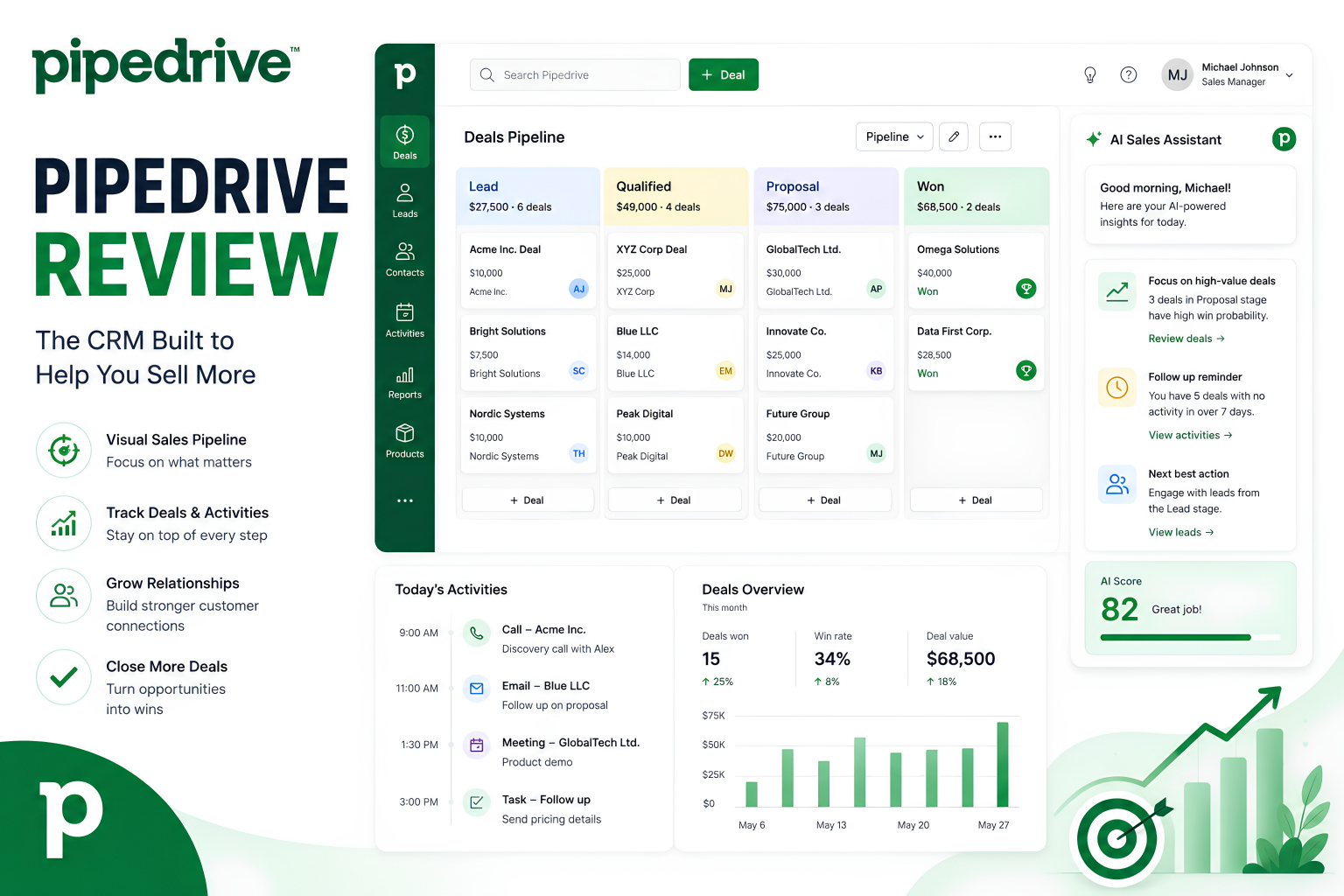
Pipedrive’s drag-and-drop pipeline board is genuinely best-in-class for visual deal management. Every deal sits in a clearly labelled stage — Lead, Qualified, Proposal Sent, Negotiation, Won, Lost — and moving a deal forward is as simple as dragging it to the next column. At a glance, every sales rep and manager can see exactly where every opportunity stands without opening a single record, attending a status meeting, or running a report.
The activity-based selling philosophy underpins everything: Pipedrive will not let a deal sit without a scheduled next action. Every deal requires a follow-up task — a call, an email, a meeting — ensuring that pipeline hygiene is structural rather than aspirational. For small sales teams where deals slip through the cracks because reps are busy, this built-in discipline is a material productivity improvement.
Multiple pipelines are supported on all paid plans, which means a business with separate processes for new business, renewals, and partnerships can track each independently without mixing signals. Pipeline stages are fully customisable to match your actual sales process rather than a generic template.
Pipedrive Review: AI Sales Assistant and Automation
Pipedrive’s AI Sales Assistant monitors your pipeline activity and surfaces actionable suggestions: which deals to prioritise based on likelihood to close, which contacts have gone quiet, which reps are hitting activity targets, and where bottlenecks are accumulating. The more the platform is used, the more accurately the assistant calibrates its suggestions to your specific sales cycle and deal velocity — a genuine improvement over rule-based alert systems.
The Pulse feature (currently in beta) takes this further, scoring leads based on engagement behaviour and surfacing the most promising prospects in a curated view rather than requiring reps to triage a flat list. It represents the next evolution of Pipedrive’s AI layer, and early feedback is positive.
Workflow automation covers the standard repetitive tasks: email sequences triggered by pipeline stage changes, task creation when deals move forward, notifications when leads go cold, and data updates across contact records. The honest limitation: automation capabilities are considerably simpler than dedicated platforms like ActiveCampaign or HubSpot’s workflows. Complex multi-branch conditional logic is not Pipedrive’s strength. For straightforward sales automation — follow-ups, stage triggers, reminders — it covers the use cases that drive results.
Pipedrive Review: Email Integration and Communications
Pipedrive syncs bidirectionally with Gmail and Outlook, pulling email history into deal and contact records automatically. Every email sent or received from a tracked contact appears in the timeline without manual logging, which eliminates one of the most consistent CRM adoption failures: reps who forget (or refuse) to update records. The Smart BCC feature also works with any email client for teams outside the Google and Microsoft ecosystem.
Email tracking shows when recipients open emails and click links, giving reps the context to follow up at the right moment rather than following a fixed schedule. Email templates and sequences are available from the Advanced plan upward, enabling consistent outreach without writing from scratch each time.
One important flag for this Pipedrive Review: the Essential plan does not include full email sync. If email integration is central to your sales workflow — and for most sales teams it is — the Essential plan is insufficient and the Advanced plan at $29/user/month becomes the practical entry point.
Pipedrive Review: Reporting and Analytics
Pipedrive’s Insights dashboard provides deal-based, activity-based, and revenue reports with customisable views. Managers can track individual rep performance, pipeline velocity, win/loss ratios, deal age, and conversion rates at each stage. For teams used to piecing this data together from spreadsheets, Pipedrive’s reporting represents a meaningful step forward.
The significant caveat: advanced reporting is substantially gated. Custom field reports, goal tracking, and the most valuable analytics dashboards require the Professional plan at $49/user/month or above. Teams on Essential or Advanced will find the reporting functional but limited compared to what Pipedrive markets in its feature list. Revenue forecasting — critical for sales managers making hiring and capacity decisions — also requires Professional and above.
This Pipedrive Review notes one additional gap: the platform lacks cohort analysis, territory segmentation, and the kind of attribution reporting that marketing-aligned sales teams need. For pure sales pipeline metrics, Pipedrive is strong. For cross-functional revenue analytics, it falls short of HubSpot or Salesforce at comparable price points.
Pipedrive Review: Lead Generation Add-Ons and Hidden Costs
Pipedrive’s core platform manages existing leads and deals. Lead generation — finding new contacts proactively — requires add-ons that are priced separately from all plan tiers.
LeadBooster ($32.50/month) adds a chatbot, live chat widget, web forms, and the Prospector database — a pool of over 400 million business contacts searchable by industry, company size, role, and location. It is a genuinely useful prospecting tool. It is also an additional $32.50/month on top of your per-user plan costs.
Web Visitors ($41/month) tracks which companies visit your website even before they fill in a form, enabling proactive outreach based on intent signals. Again, useful — and again, not included in any plan tier.
This add-on model is one of the most frequent criticisms in user reviews. A five-person team on the Advanced plan ($29/user/month) paying for LeadBooster and Web Visitors pays $145 per month in plan costs plus $73.50 in add-ons — $218.50 total — before considering the Campaigns email marketing module ($16/month for up to 1,000 contacts) or Smart Docs with eSignatures ($32.50/month). The gap between advertised entry pricing and realistic operational cost is wider than the plan page suggests.
Pipedrive Review: Integrations and Open API
Pipedrive integrates natively with over 400 third-party tools — Gmail, Outlook, Slack, Zoom, Trello, QuickBooks, Xero, Zapier, HubSpot, Mailchimp, and many more. The Marketplace covers the most common business stack combinations comprehensively. For custom integrations and developer workflows, Pipedrive’s open API is well-documented and actively maintained on GitHub by the Pipedrive developer community, with client libraries available for major programming languages. For technical teams building custom sales operations tooling, the API is a genuine asset.
Pipedrive Review: Pricing Plans Explained
Pipedrive charges per user per month, billed annually. All plans include a 14-day free trial. There is no permanent free plan — unlike HubSpot’s free CRM, Pipedrive requires a paid commitment after the trial ends.
| Plan | Price (annual) | Key inclusions | Key limitations |
|---|---|---|---|
| Essential | $14/user/mo | Pipeline, deals, contacts, calendar, basic reporting, mobile app | No full email sync, no automation, no workflow builder |
| Advanced | $29/user/mo | Full email sync, email tracking, workflow automation, email templates, sequences | Limited reporting, no revenue forecasting, no custom dashboards |
| Professional | $49/user/mo | Revenue forecasting, custom dashboards, lead scoring (Pulse beta), contract management, phone support | Still no built-in SMS, no multi-channel sequences without add-ons |
| Power | $64/user/mo | Project management, enhanced automations, phone support, higher API limits | Per-user cost escalates quickly for larger teams |
| Enterprise | $99/user/mo | SSO, advanced security, unlimited automations, dedicated account manager, enhanced reporting | Expensive at scale — a 10-person team pays $990/mo before add-ons |
The practical entry point for most teams is the Advanced plan at $29/user/month. The Essential plan’s lack of email sync and automation makes it insufficient for any sales team running a real process. This Pipedrive Review recommends trialling on Advanced, then evaluating whether Professional-tier reporting and forecasting justify the additional $20/user/month for your team’s specific needs.
Pipedrive Review: Honest Pros and Cons
- Best-in-class visual pipeline — drag-and-drop deal management that sales reps actually adopt
- Activity-based selling philosophy — no deal sits without a next action
- Fastest CRM to set up in its category — productive within hours, not weeks
- AI Sales Assistant improves deal prioritisation without requiring data science expertise
- Pulse lead scoring (beta) surfaces highest-priority prospects automatically
- Bidirectional Gmail and Outlook sync with email tracking on all paid plans
- 400+ native integrations covering most business stacks
- Well-documented open API for custom development
- 4.3/5 on G2 and 4.5/5 on Trustpilot from thousands of verified reviews
- 20–30% affiliate commissions for 12 months via PartnerStack, 90-day cookie
- No free plan — HubSpot’s free CRM is the alternative if zero cost is required
- Essential plan lacks email sync — Advanced ($29/user) is the real minimum
- Add-ons (LeadBooster, Web Visitors, Campaigns, Smart Docs) inflate real costs significantly
- Advanced reporting and revenue forecasting locked behind Professional plan ($49/user)
- Phone support only on Professional, Power, and Enterprise plans
- No built-in SMS or multi-channel outreach sequences
- Marketing automation requires add-ons — not a native capability
- D- BBB rating with billing dispute complaints (legacy pricing changes, add-on charges)
- Mobile app consistently rated harder to use than desktop by users
- Commissions expire after 12 months — no lifetime recurring like AWeber
Pipedrive Review: How It Compares to HubSpot, Zoho & Salesforce
| Feature | Pipedrive | HubSpot CRM | Zoho CRM | Salesforce |
|---|---|---|---|---|
| Starting price | $14/user/mo | Free CRM | $14/user/mo | $25/user/mo |
| Free plan | ❌ Trial only | ✅ Generous | ✅ Limited | ❌ No |
| Visual pipeline | ✅ Best-in-class | Good | Good | Complex |
| Ease of setup | ✅ Hours | Days–weeks | Days | Weeks–months |
| Marketing automation | Add-on only | ✅ Native (paid) | ✅ Native | ✅ Native (expensive) |
| Reporting depth | Good (Professional+) | ✅ Excellent | Good | ✅ Enterprise-grade |
| Best for | Pure sales pipeline | Sales + marketing | Budget all-in-one | Enterprise scale |
The comparison above reflects a clear positioning truth: Pipedrive delivers approximately 80% of Salesforce’s sales pipeline functionality at roughly 25% of the cost and complexity. For pure sales teams — particularly those in B2B SaaS, consulting, digital agencies, and professional services — that 80% covers virtually every workflow that actually drives revenue. Where the comparison turns against Pipedrive is for teams that need marketing automation, customer service ticketing, or unified revenue operations under one platform.
For context on how marketing automation differs from sales CRM functionality, the distinction matters for the buying decision: Pipedrive is optimised for the sales layer of the funnel, not the marketing layer. If your team needs both, either add a dedicated email marketing tool alongside Pipedrive or evaluate HubSpot’s all-in-one platform despite the higher cost.
Pipedrive Review: Who Should Use It
In this Pipedrive Review, the ideal user profile and the clear mismatches are both worth spelling out. and the cases where a different platform will serve better.
Pipedrive is the right CRM for:
- Small to mid-sized B2B sales teams running deal-based selling with clearly defined pipeline stages — the visual pipeline is built precisely for this workflow
- SaaS companies, digital agencies, consultancies, and professional services firms where deals move in days to weeks, not months or years, and reps need to track many opportunities simultaneously
- Teams migrating from spreadsheets — Pipedrive is the fastest CRM to implement meaningfully, with setup achievable in hours rather than days or weeks
- Businesses that prioritise sales rep adoption — Pipedrive’s ease of use means reps actually log their activities, making pipeline data accurate and actionable rather than perpetually stale
- Teams with 2–50 users wanting strong pipeline visibility without the complexity of Salesforce or the marketing sprawl of HubSpot
Pipedrive is the wrong choice for:
- Teams that need a free plan — HubSpot’s free CRM is the strongest alternative in the market for organisations that cannot commit to paid software before proving ROI
- Marketing-led or inbound-focused businesses — Pipedrive lacks native email marketing campaigns, landing pages, and lead nurture flows. These require either the Campaigns add-on or a separate email platform
- Teams running complex, long-cycle enterprise sales — the reporting depth and territory management tools in Salesforce and HubSpot Sales Hub are more appropriate for multi-stakeholder deals spanning months
- Growing teams sensitive to per-seat cost escalation — a 20-person team on Professional with standard add-ons can reach $1,200/month or more
Pipedrive Review: Final Verdict
To summarise this Pipedrive Review: Pipedrive is the best pure sales pipeline CRM in its price range for the teams it is designed to serve. The visual pipeline, activity-based selling model, and fast implementation timeline are genuinely differentiating. No comparable platform makes deal management as immediately intuitive, and high adoption rates — the chronic failure mode of most CRM implementations — are a structural outcome of good design rather than training investment.
The limitations are real and specific. No free plan. Genuine useful functionality starts at $29/user/month on Advanced, not the advertised $14. Add-ons compound the real cost well beyond the plan page numbers. Advanced reporting and revenue forecasting require the $49/user Professional plan. Phone support is unavailable below Professional. And for teams that need marketing automation, multi-channel outreach, or unified sales-and-marketing analytics, Pipedrive requires external tools or a more comprehensive platform.
The final Pipedrive Review recommendation: start the 14-day trial on the Advanced plan with real deal data and your actual pipeline stages. Import a meaningful segment of your contact list. Build the stages your team actually uses. Run a real week of sales activity. That trial will tell you more than any feature comparison — either Pipedrive’s pipeline-first philosophy fits your selling motion, or it reveals what you actually need from a CRM before you commit.
No credit card required · Cancel any time · All plans available to trial
Pipedrive Review: Frequently Asked Questions
This article contains affiliate links. We may earn a commission if you purchase through our links, at no extra cost to you.