The GetResponse vs AWeber debate is one of the most common questions in email marketing — two established platforms, both aimed at small businesses, both with years of history and solid feature sets. But they are not equal, and for the use cases that matter most to small businesses and solo operators, the differences are significant. This GetResponse vs AWeber comparison breaks down deliverability, pricing, customer support, templates, automation, and integrations — so you can make the right call the first time without switching platforms six months later.
- GetResponse vs AWeber: At a Glance
- GetResponse vs AWeber: Deliverability
- GetResponse vs AWeber: Customer Support
- GetResponse vs AWeber: Pricing
- GetResponse vs AWeber: Email Templates and Design
- GetResponse vs AWeber: Automation
- GetResponse vs AWeber: Integrations
- GetResponse vs AWeber: Who Should Choose Which
- GetResponse vs AWeber: Our Recommendation
- GetResponse vs AWeber: Frequently Asked Questions
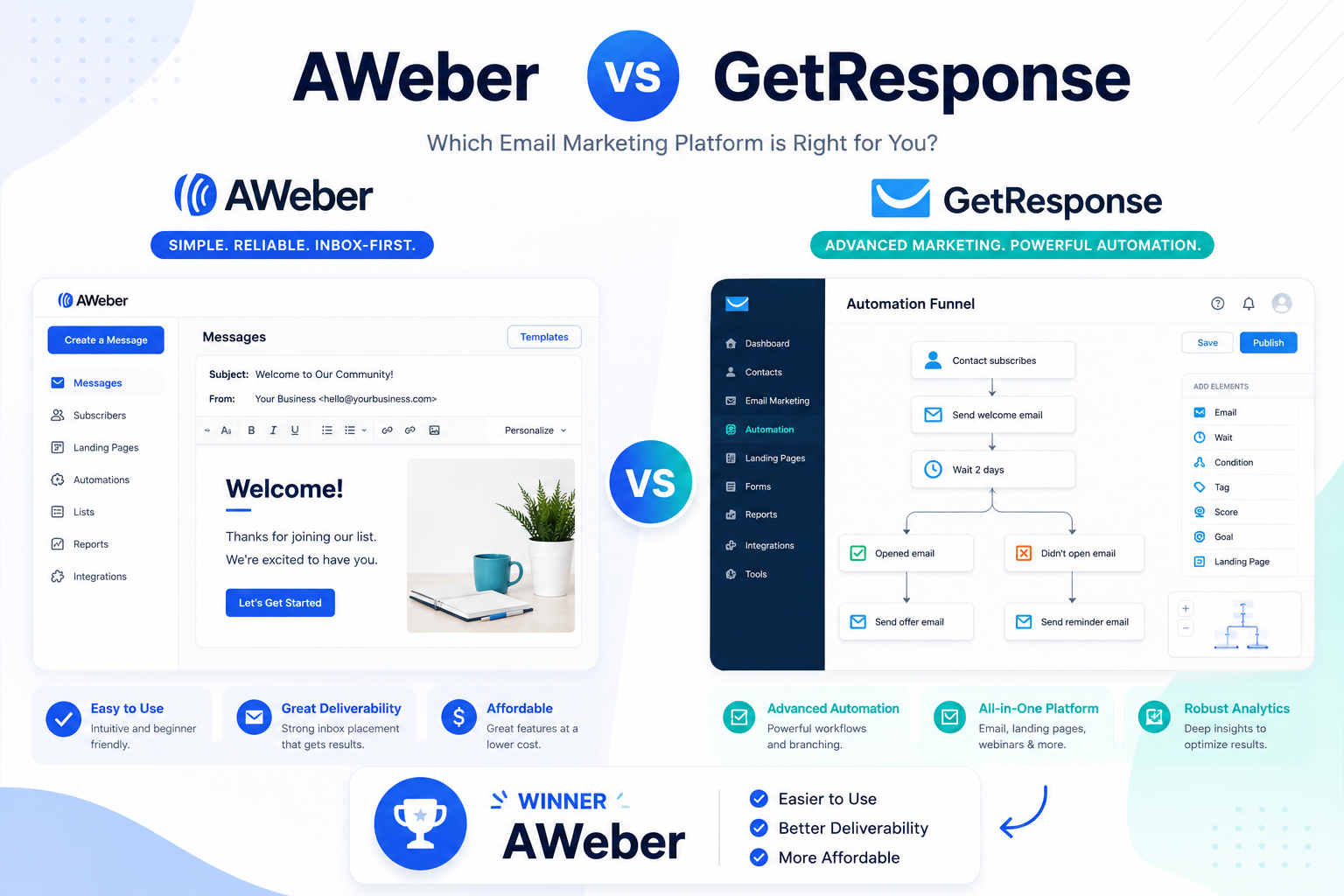
The short answer: AWeber wins for most small businesses and bloggers who prioritise inbox placement, genuine customer support, and pricing transparency. GetResponse has its strengths — particularly its webinar tools and visual automation builder — but its billing practices, deliverability inconsistencies, and support limitations create friction that small teams cannot afford. This GetResponse vs AWeber guide explains exactly why, category by category.
- Prioritise inbox deliverability above all
- Want 24/7 phone + chat + email support on every plan
- Need 750+ integrations and 700+ templates
- Want lifetime recurring affiliate commissions
- Value transparent billing with no surprises
- Run webinars as a core part of your marketing
- Need a built-in conversion funnel builder
- Want advanced if/then automation workflows
- Are comfortable with no refund policy
- Do not need phone support
GetResponse vs AWeber: At a Glance
| Category | AWeber ✅ | GetResponse | Winner |
|---|---|---|---|
| Email deliverability | 91/100 score | ~82% inbox rate | ✅ AWeber |
| Customer support | Phone + chat + email all plans | No phone (Enterprise only) | ✅ AWeber |
| Email templates | 700+ | ~200 | ✅ AWeber |
| Third-party integrations | 750+ | ~250 | ✅ AWeber |
| Free plan | Yes (500 subscribers) | Yes (500 contacts, limited) | Tie |
| Refund policy | 30-day money-back | No refunds | ✅ AWeber |
| Webinar hosting | Not available | Built-in (Marketer plan+) | GetResponse |
| Visual automation builder | Linear sequences | Advanced if/then workflows | GetResponse |
| Affiliate commissions | 30–50% lifetime recurring | 40–60% for 12 months only | ✅ AWeber |
| Duplicate contact billing | Unsubscribed excluded | Duplicates billed twice | ✅ AWeber |
GetResponse vs AWeber: Deliverability
In any GetResponse vs AWeber comparison, deliverability is the most important metric — and it is where the gap between the two platforms is most consequential. Your email marketing strategy produces zero return if emails do not reach the primary inbox.
AWeber consistently scores 91/100 in independent deliverability testing, with primary inbox placement the clear norm. The platform has maintained this reputation since 1998 by focusing on list hygiene tools, proactive ISP relationship management, and strict anti-spam enforcement from the sender side. Web push notifications are included on all plans — a feature GetResponse does not offer — extending AWeber’s reach beyond the inbox entirely.
GetResponse’s independently tested inbox placement rate sits at approximately 82%, meaning roughly one in five emails never reaches the primary inbox. Users frequently report emails landing in Gmail’s Promotions tab rather than the inbox — a consistent pattern across independent reviews and user complaints. Some users with fully sanitised lists have reported emails simply not arriving at recipients at all, with no diagnostic data available to explain why.
Understanding email marketing best practices makes clear why deliverability should be weighted heavily in any platform decision — inbox placement directly determines whether your investment in list building and campaign creation produces a return. AWeber wins this category decisively.
GetResponse vs AWeber: Customer Support
This is one of the sharpest contrasts in the entire GetResponse vs AWeber comparison, and the one that causes the most frustration for small business owners who discover it after signing up.
AWeber offers 24/7 phone support, live chat, and email support on every plan — including the free plan. You can pick up the phone and speak to a human regardless of how much you are paying. Support satisfaction rates across Capterra and Software Advice stand at 89% positive reviews, with users consistently praising response speed and problem resolution.
GetResponse offers 24/7 live chat and email support — but no phone support on any plan except Enterprise. For small businesses that encounter a billing problem, a campaign timing failure, or an account access issue, being limited to chat support without a phone escalation option is a meaningful constraint. GetResponse support satisfaction sits at 69% positive reviews — a 20-point gap below AWeber on the same dataset.
There is also the migration question. AWeber provides free migration of email templates, automations, lists, and subscriber data when you switch from another platform. GetResponse does not offer a comparable migration service. For businesses moving from Mailchimp, ConvertKit, or any other platform, AWeber’s white-glove migration removes a significant barrier to switching.
GetResponse vs AWeber: Pricing
Pricing in the GetResponse vs AWeber comparison is more nuanced than headline numbers suggest — because the structure of how each platform bills matters as much as the rates themselves.
| List size | AWeber (annual) | GetResponse Starter (annual) | GetResponse Marketer (annual) |
|---|---|---|---|
| 500 subscribers | $15/mo (Lite) | $19/mo (1,000 min) | $59/mo (1,000 min) |
| 2,500 subscribers | $30/mo (Plus) | $25/mo | $79/mo |
| 10,000 subscribers | $70/mo | $59/mo | $95/mo |
| Key automation access | Plus plan ($30/mo) | Marketer plan required ($59/mo) | ✅ Included |
GetResponse is cheaper than AWeber at larger list sizes on the Starter plan — that much is accurate. But the Starter plan does not include the visual automation builder that GetResponse markets as a core feature. To access that, you need the Marketer plan at $59/month for 1,000 contacts — a 210% price jump from the $19 entry point. The platform you see advertised at $19/month is not the platform you get for $19/month.
AWeber’s pricing structure is more transparent. The Plus plan at $30/month covers up to 2,500 subscribers with full automation access, and the pricing scales predictably from there. Crucially, AWeber excludes unsubscribed contacts from billing — so your cost does not inflate based on contacts who have already opted out. GetResponse bills for duplicate contacts across lists, which can significantly inflate costs as your list management becomes more complex over time.
The refund policy difference is also significant: AWeber offers a 30-day money-back guarantee; GetResponse offers no refunds on any plan, monthly or annual.
GetResponse vs AWeber: Email Templates and Design
AWeber holds a clear advantage in template volume in this GetResponse vs AWeber evaluation. With 700+ professionally designed email templates across newsletters, promotions, announcements, seasonal campaigns, and product launches, AWeber gives you more starting points than almost any comparable platform. The Smart Designer tool automatically generates branded templates from your website URL — pulling in your colours, logo, and fonts — without requiring manual design work.
GetResponse offers approximately 200 templates, which covers the core use cases but provides less variety. The templates are modern and well-designed, and the email editor itself is polished — but the smaller library means you are more likely to reach for the same designs repeatedly as your sending volume grows.
Both platforms support drag-and-drop editing, responsive mobile preview, and custom HTML for advanced users. AWeber additionally supports AMP emails — interactive content that allows subscribers to take actions directly within the email (RSVP, fill in forms, browse products) without clicking through to a landing page — a format GetResponse does not currently support.
GetResponse vs AWeber: Automation
GetResponse has the stronger automation builder in this GetResponse vs AWeber comparison — but with an important caveat. The visual if/then workflow builder with branching logic, conditional splits, and behavioural triggers is genuinely more sophisticated than AWeber’s linear sequence approach. For businesses running complex, multi-path automation journeys, GetResponse delivers more flexibility at the workflow level.
The caveat: that automation builder is locked behind the Marketer plan at $59/month minimum. On the $19 Starter plan, you get basic autoresponders and time-based sequences only. AWeber’s automation, while simpler in structure, is accessible from the Plus plan at $30/month and covers the use cases that drive the majority of email marketing results for small businesses — welcome sequences, behavioural triggers, tag-based segmentation, and subscriber journey branching based on engagement.
For the majority of small businesses and bloggers running GetResponse vs AWeber as a practical decision, AWeber’s automation covers 90% of real-world use cases at a lower price point than accessing GetResponse’s equivalent functionality.
GetResponse vs AWeber: Integrations
AWeber’s 750+ native integrations significantly outpace GetResponse’s approximately 250. The breadth matters for businesses that have already built a tech stack around tools that may not be in GetResponse’s native integration library. E-commerce platforms, CRM tools, payment processors, landing page builders, webinar tools, and productivity apps all have direct AWeber connectors — with free white-glove migration included for businesses switching from another platform.
Building on solid technical foundations is critical for web performance and deliverability best practices — and AWeber’s infrastructure, maintained by an in-house deliverability team since 1998, reflects that commitment. GetResponse relies more heavily on Zapier for integrations outside its native library, which adds a dependency and a potential additional monthly cost for businesses that need connections beyond the built-in set.
GetResponse vs AWeber: Who Should Choose Which
After running through every category in this GetResponse vs AWeber comparison, the right choice becomes clear based on your priorities.
AWeber is the better choice for:
- Small businesses and bloggers for whom inbox placement is the primary metric — AWeber’s deliverability reputation is built over 25 years
- Anyone who values responsive human support — the 24/7 phone access on all plans, including free, is unmatched in this price range
- Teams migrating from another platform — free migration service removes the biggest barrier to switching
- Affiliate marketers — AWeber’s 30–50% lifetime recurring commissions never expire, versus GetResponse’s 12-month cap
- Businesses that need web push notifications — AWeber includes them on all plans; GetResponse does not offer this channel
GetResponse is the better choice for:
- Marketers running webinars as a core revenue channel — built-in webinar hosting is GetResponse’s strongest differentiator
- Businesses running complex sales funnels — the conversion funnel builder with landing pages, upsells, and payment integration is a genuine all-in-one advantage
- Advanced automation users on the Marketer plan and above — the visual if/then workflow builder is more sophisticated than AWeber’s
GetResponse vs AWeber: Our Recommendation
For most small businesses evaluating GetResponse vs AWeber, AWeber is the stronger platform. The deliverability advantage, the 24/7 phone support on every plan, the 750+ integrations, the 700+ templates, the fairer billing structure, and the lifetime affiliate commissions all tip decisively in AWeber’s favour for the use cases that drive real-world email marketing results.
GetResponse’s advantages — webinars, advanced automation, conversion funnels — are real, but they are features that serve a specific type of marketer running a specific kind of business. For that user, the Marketer plan at $59/month earns its price. For everyone else, paying more for a platform with lower inbox placement, no phone support, no refunds, and billing practices that inflate costs over time is a difficult case to make.
We have published in-depth reviews of both platforms on BST. Read our full AWeber Review — covering its 91/100 deliverability score, 700+ templates, 750+ integrations, and 24/7 phone support in full detail. We have also published an honest GetResponse Review that walks through the platform’s deliverability issues, billing structure, and where it genuinely excels.
GetResponse vs AWeber: Frequently Asked Questions
This article contains affiliate links. We may earn a commission if you purchase through our links, at no extra cost to you.